

Introduction
Let’s be honest, bhai — when you first open Excel, it looks simple… but the moment you try to actually use it, things get confusing real quick 😅
The good news? You don’t need to learn everything at once.
If you just master a few excel basic formulas, you can already:
- Save hours of manual work
- Avoid calculation mistakes
- Start thinking like a data analyst
In this guide, I’ll walk you through the top 7 Excel formulas every beginner should know, with simple examples and real-life use cases (no boring theory, promise 😎).
Why Learning Excel Basic Formulas Matters
Before jumping into formulas, samajh lo why this matters:
👉 Excel is used in:
- Freelancing (Upwork, Fiverr gigs)
- Office jobs
- Data analysis
- Business tracking
And guess what?
👉 80% of Excel work relies on just basic formulas
So instead of learning 100+ functions, focus on the right 7 first.
Top 7 Excel Basic Formulas (Quick Comparison Table)
| Formula | Purpose | Example | Use Case |
|---|---|---|---|
| SUM | Add numbers | =SUM(A1:A5) | Total sales |
| AVERAGE | Find mean | =AVERAGE(A1:A5) | Average marks |
| COUNT | Count numbers | =COUNT(A1:A5) | Data entries |
| IF | Logical condition | =IF(A1>50,”Pass”,”Fail”) | Results |
| VLOOKUP | Find data | =VLOOKUP(A2,B2:C10,2,FALSE) | Lookup info |
| CONCAT | Combine text | =CONCAT(A1,B1) | Full name |
| MAX/MIN | Highest/Lowest | =MAX(A1:A5) | Best/worst value |
1. SUM Formula (Most Used Formula)
📌 What it does:
Adds numbers quickly.
✅ Syntax:
=SUM(A1:A3)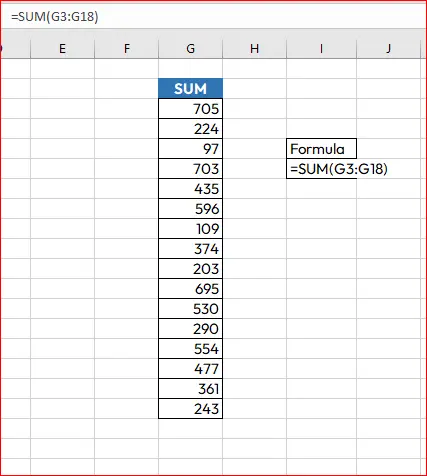
💡 Example:
You have sales data:
100, 200, 300Formula:
=SUM(A1:A3)Result: 600
🔥 Real-life use:
- Total income
- Monthly expenses
- Marks calculation
👉 Bhai, this is the #1 formula — you’ll use it daily.
2. AVERAGE Formula
📌 What it does:
Finds the average (mean value)
✅ Syntax:
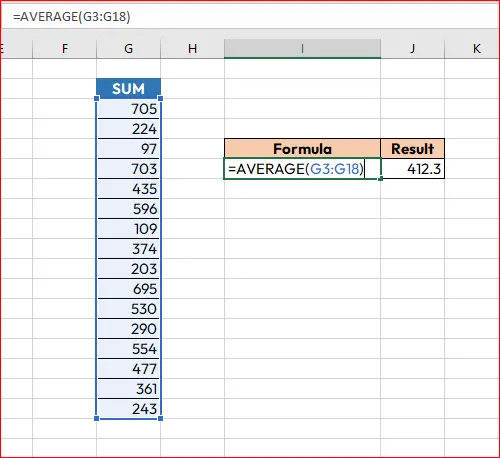
=AVERAGE(A1:A5)
💡 Example:
Marks: 50, 60, 70
Result:
=AVERAGE(A1:A3) → 60🔥 Use case:
- Student results
- Performance analysis
- Business metrics
👉 Beginner mistake: Don’t calculate manually — Excel does it instantly.
3. COUNT Formula
📌 What it does:
Counts cells that contain numbers
✅ Syntax:
=COUNT(A1:A10)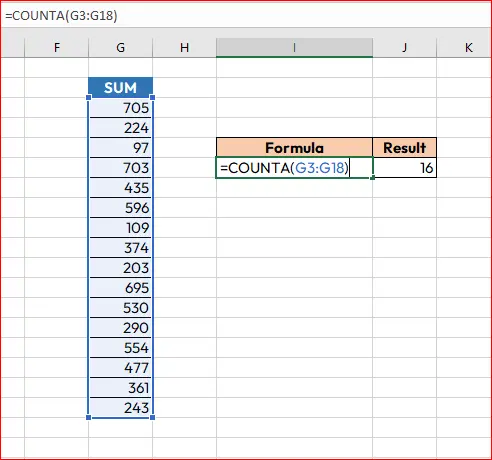
💡 Example:
If 5 cells contain numbers → result = 5
🔥 Use case:
- Counting entries
- Data cleaning
- Checking dataset size
👉 Pro tip:
COUNT→ numbers onlyCOUNTA→ everything (text + numbers)
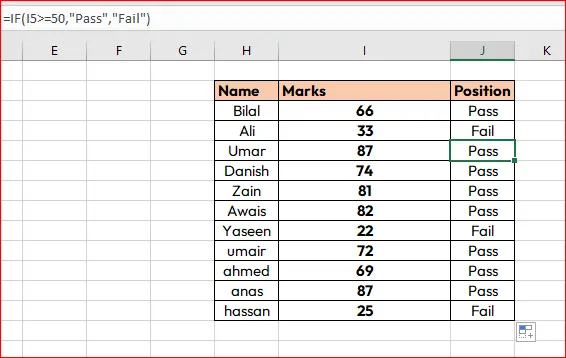
4. IF Formula (Game Changer)
📌 What it does:
Applies logic (conditions)
✅ Syntax:
=IF(condition, value_if_true, value_if_false)💡 Example:
=IF(A1>=50,"Pass","Fail")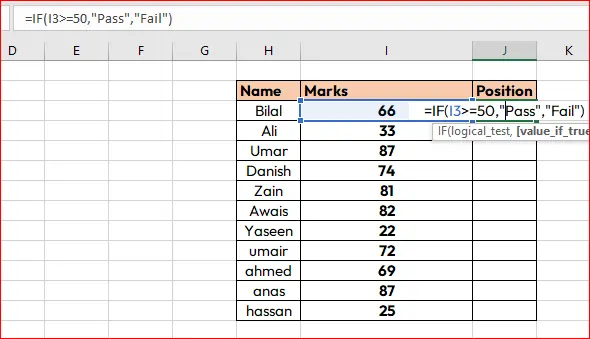
🔥 Real-life use:
- Student grading
- Salary bonuses
- Decision making
👉 Bhai, this is where Excel becomes powerful 💪
5. VLOOKUP Formula (Most Powerful for Beginners)
📌 What it does:
Finds data in a table
✅ Syntax:
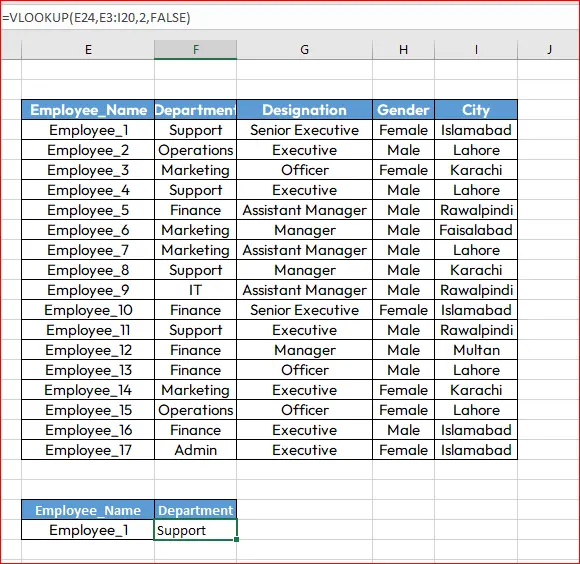
=VLOOKUP(value, table, column, FALSE)💡 Example:
Find price of product:
=VLOOKUP(A2,B2:C10,2,FALSE)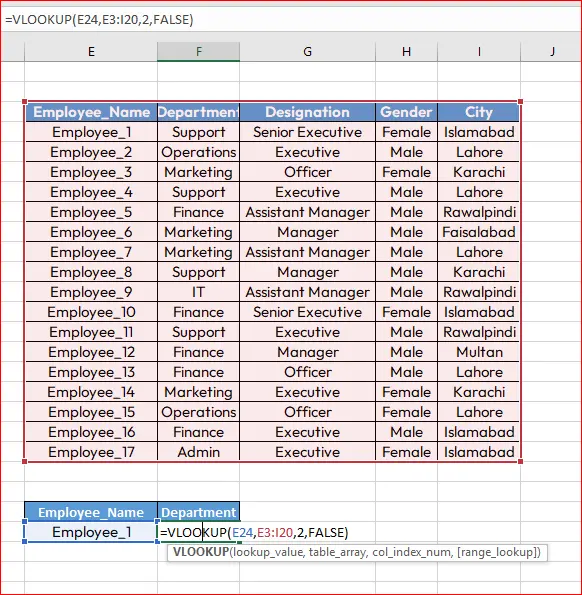
🔥 Use case:
- Product lookup
- Employee records
- Data matching
👉 Important:
- Always use
FALSEfor exact match - Table must be properly structured
6. CONCAT / CONCATENATE Formula
📌 What it does:
Combines text
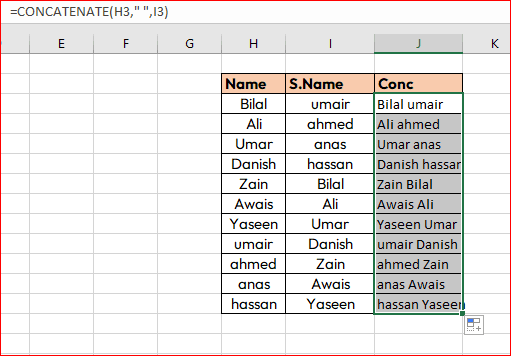
✅ Syntax:
=CONCAT(A1," ",B1)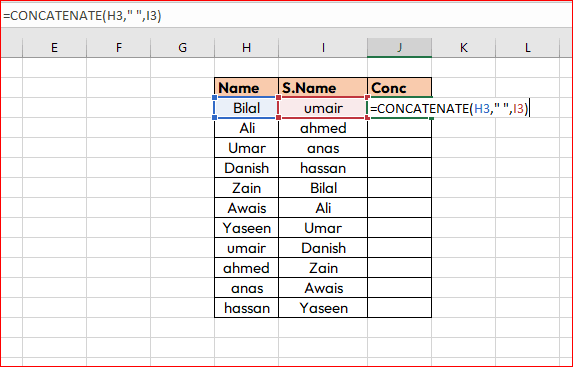
💡 Example:
First Name + Last Name
Result: “Ali Khan”
🔥 Use case:
- Full names
- Email creation
- Data formatting
👉 Modern Excel uses CONCAT instead of CONCATENATE
7. MAX & MIN Formulas
📌 What they do:
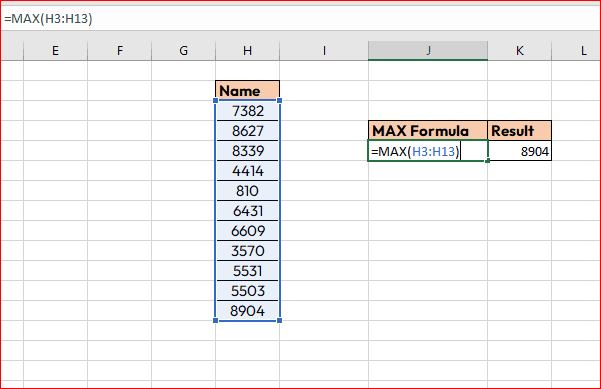
- MAX → highest value
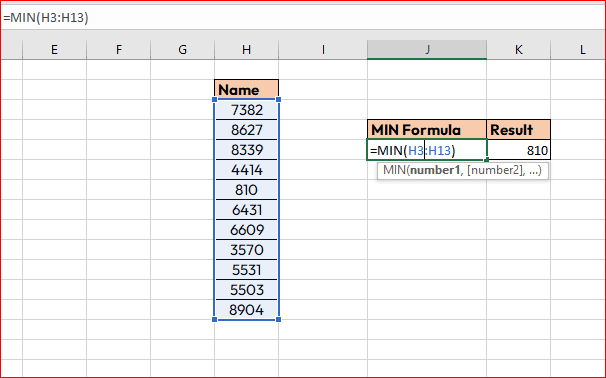
- MIN → lowest value
✅ Syntax:
=MAX(A1:A10)
=MIN(A1:A10)
💡 Example:
Marks: 45, 88, 67
- MAX → 88
- MIN → 45
🔥 Use case:
- Best performance
- Lowest sales
- Data insights
Key Insights (Important for Beginners)
Bhai, yeh section gold hai — dhyan se 👇
🎯 1. Start Small
Don’t try to learn everything at once. These 7 formulas = strong foundation.
🎯 2. Practice Daily
Even 20–30 minutes daily = huge improvement.
🎯 3. Use Real Data
Practice on:
- Expenses
- Student marks
- Freelancing data
🎯 4. Combine Formulas
Example:
=IF(AVERAGE(A1:A5)>50,"Pass","Fail")
👉 This is how you level up 🚀
“Master these excel basic formulas today, and you’ll unlock the power to work smarter, faster, and more confidently in Excel.”